Property Communication Task Center
Security Camera Installation & Privacy Notice 🛡️ 2026 OSHA/FHA Compliant
Deploy community security cameras in full compliance with federal and state privacy laws — ensuring no audio is recorded (Federal Wiretap Act), no private areas are captured (Reasonable Expectation of Privacy), proper bilingual signage is posted, data retention policies are established, and a formal video access request protocol is implemented to protect both community safety and resident privacy rights.
Not just a template.
A reality execution tool.
Don't risk tenant disputes with messy Word docs. Generate a print-ready, OSHA-compliant physical notice in exactly 30 seconds.
- 1Bilingual Architecture English & Spanish integrated into a single US Letter design. Crucial for legal compliance in 14+ states.
- 2Toner-Friendly Print Engineered for black-and-white office printers. High contrast hierarchy ensures readability from 10 feet away.
- 3Locked Formatting Zero layout breakage. Type your details, and the engine physicalizes it without overflowing the page.
SECURITY CAMERA & PRIVACY NOTICE
AVISO DE CÁMARAS Y PRIVACIDAD
Why use this template?
- ✓ Bilingual output (English/Spanish) prevents FHA liability
- ✓ Formatted strictly for US Letter B&W physical printing
- ✓ Zero JS bloat, generates instantly in your browser
Print Output Preview
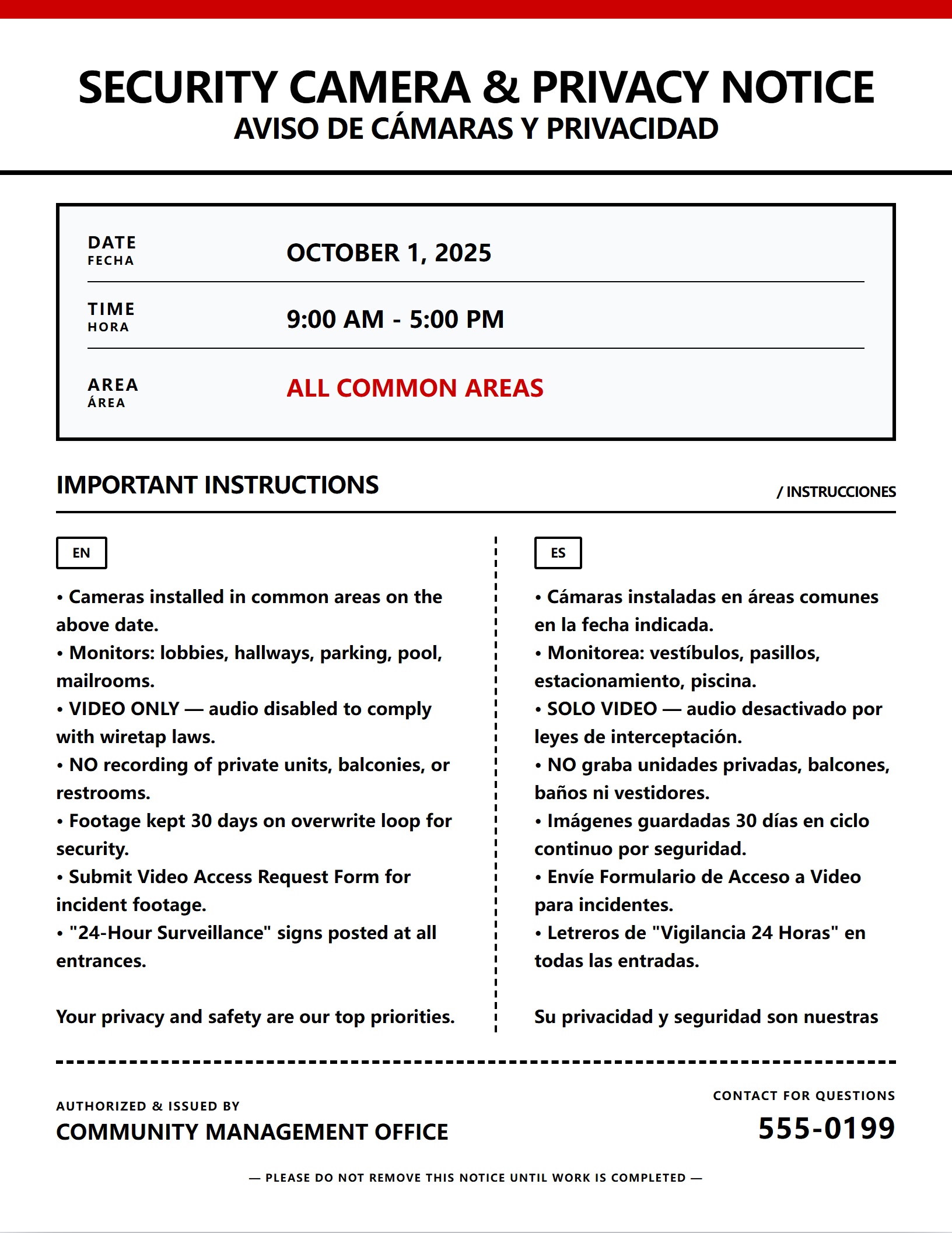
📋 Field Execution Asset
Download the OSHA-compliant manager checklist to ensure zero liability on-site.
🏠 Tenant Distribution Asset
Attach this prep-guide to your notice to reduce tenant front-desk calls by 60%.
Notice Editor & Preview
Edit Notice
Live Print Preview
US Letter • 8.5" x 11"
Legal Deadline Calculator
Powered by US Office of Personnel Management (OPM) rules.
Conduct Privacy Impact Assessment & Camera Placement Audit
Disable Audio Recording on All Cameras (Wiretap Act Compliance)
Adopt Formal Security Camera & Data Retention Policy
Send Community-Wide Digital Privacy & Installation Notice
Post Bilingual Video Surveillance Signs at All Monitored Areas
Install Cameras & Conduct Field-of-View Privacy Verification
Compliance & Legal Disclaimer: Calculations are strictly based on U.S. Office of Personnel Management (OPM) observed federal holiday rules and standard weekend exclusions. While this tool is designed for enterprise-grade accuracy regarding FLSA and standard property management protocols (e.g., CA Civil Code §1950.5), local municipal codes may vary. NoticeMint is a workflow software, not a law firm. Always verify critical statutory deadlines with your legal counsel.
Execution Protocol
Operational Timeline & Compliance Checklist
- 30 Days Before Installation Responsible: property manager
Conduct Privacy Impact Assessment & Camera Placement Audit
⚠️Liability Alert
A single camera capturing the interior of a resident's unit (even partially through an open door or window) constitutes an invasion of privacy tort and can trigger statutory damages exceeding $5,000 per incident plus injunctive relief. If any camera FOV overlaps a private area, the camera MUST be repositioned, fitted with a physical privacy mask, or equipped with software-based privacy masking (black-out zones) before activation.
💡Pro Strategy
Map every proposed camera location and verify the field-of-view (FOV) captures ONLY common areas (lobbies, hallways, parking lots, pool decks, clubhouses, mail kiosks). Under the "Reasonable Expectation of Privacy" doctrine, cameras must NEVER capture: (1) Inside private units through windows/doors, (2) Inside fenced private patios/balconies, (3) Restrooms, locker rooms, or changing areas, (4) Fitness center workout areas where residents may be in athletic attire. Use camera simulation software or physical stand-ins to verify FOV before installation.
- 21 Days Before Activation Responsible: property manager
Disable Audio Recording on All Cameras (Wiretap Act Compliance)
⚠️Liability Alert
Recording audio in common areas without all-party consent is a FEDERAL FELONY (up to 5 years imprisonment) and a state criminal offense in two-party consent states. Even if your camera hardware supports audio, you MUST disable it. Document the audio-disablement in writing and have the installation contractor sign a certification that audio recording is permanently disabled on all cameras.
💡Pro Strategy
Federal Wiretap Act (18 U.S.C. § 2511) prohibits the intentional interception of oral communications without consent. 11 states (CA, FL, IL, MD, MA, MT, NV, NH, PA, WA, and others) require ALL-PARTY consent for audio recording. In a community common area, obtaining consent from every person who walks by is impossible. Therefore, ALL security cameras MUST have audio recording capabilities physically disconnected or permanently disabled in software. Configure the NVR (Network Video Recorder) to record VIDEO ONLY.
- 14 Days Before Installation Responsible: hoa board
Adopt Formal Security Camera & Data Retention Policy
⚠️Liability Alert
Do NOT use security cameras to enforce minor CC&R violations (e.g., dog walking without a leash, taking out trash on the wrong day). Using security footage for general surveillance and rule enforcement exceeds the stated security purpose and creates privacy liability. Cameras are for: criminal deterrence, property damage investigation, and liability defense ONLY.
💡Pro Strategy
The HOA Board must formally adopt a written Security Camera Policy at a noticed board meeting. The policy must specify: (1) Purpose of cameras (security and liability only — NOT for monitoring resident behavior or enforcing minor CC&R violations), (2) Data retention period (industry standard is 15-30 days continuous loop overwrite), (3) Who has access to live feeds and recordings (ONLY designated property manager and board president — never general staff or contractors), (4) Video access request procedure for residents, (5) Law enforcement cooperation protocol.
- 14 Days Before Installation Responsible: property manager AUTOMATABLE
Send Community-Wide Digital Privacy & Installation Notice
⚠️Liability Alert
Do NOT publish exact camera angles, blind spots, or technical specifications (resolution, night vision range) in the public notice. This information could be exploited by criminals to identify surveillance gaps. Keep the notice focused on locations, privacy protections, and resident rights.
💡Pro Strategy
Send a bilingual digital notice via portal + SMS + email simultaneously. The notice must include: (1) Installation dates and affected areas, (2) Camera locations (general description — e.g., "all building lobbies, parking lot perimeters, and pool entrances"), (3) Explicit statement that cameras record VIDEO ONLY (no audio), (4) Data retention period (30-day loop), (5) Link to the full adopted Security Camera & Privacy Policy, (6) How to submit a Video Access Request Form.
- 3 Days Before Activation Responsible: property manager
Post Bilingual Video Surveillance Signs at All Monitored Areas at All Building Lobbies, Parking Lot Entrances, Pool/Clubhouse Entrances, Elevator Lobbies, Mail Kiosk Areas
⚠️Liability Alert
Do NOT install cameras in any area without posting signage FIRST. Covert/hidden surveillance in common areas (without posted notice) violates state privacy laws in most jurisdictions and invalidates any evidence collected. Signs must be posted before cameras are activated, not after.
💡Pro Strategy
Post highly visible bilingual signs (minimum 12"×18", weather-resistant, with camera icon) at every entrance to monitored areas. Signs must state: "24-Hour Video Surveillance in Use / Vigilancia por Video las 24 Horas" and include: (1) Purpose ("For security purposes only"), (2) "Video recording only — no audio recorded," (3) Property management contact info. The signage itself constitutes "constructive notice" — once posted, anyone entering the area has been legally notified that they are on camera and cannot claim a privacy violation.
- Installation Day Responsible: contractor
Install Cameras & Conduct Field-of-View Privacy Verification
⚠️Liability Alert
Do NOT rely on the installer's judgment alone for FOV verification. The property manager or designated board member MUST personally review every camera's live feed. Installers optimize for coverage, not privacy — it is the HOA's legal responsibility to ensure no private areas are captured.
💡Pro Strategy
After physical installation, the property manager must conduct a live field-of-view (FOV) verification on every camera with the installer present. Review each camera's live feed on a monitor and verify: (1) No private unit interiors are visible through windows/doors, (2) No private balconies/patios are captured, (3) No restrooms or changing areas are in frame, (4) Privacy masks (digital black-out zones) are applied where necessary (e.g., masking a camera edge that catches a neighbor's yard). Document the FOV verification with screenshots of each camera's live feed.
- Within 48 Hours After Activation Responsible: property manager AUTOMATABLE
Publish Video Access Request Protocol & Completion Notice
⚠️Liability Alert
Do NOT allow residents to view live camera feeds or browse recorded footage casually. All access must go through the formal request process to protect the privacy of other residents captured in the footage. Casual access to footage creates severe privacy liability and potential harassment claims.
💡Pro Strategy
Send a completion notice confirming cameras are active, and publish the formal Video Access Request Protocol: (1) Downloadable Video Access Request Form, (2) Required information (date, time window, specific camera location, incident description), (3) Processing time (typically 3-5 business days), (4) Fee schedule (if any — best practice is free for the first request per incident, $25-$50 for subsequent requests to cover staff time), (5) Privacy disclaimer that footage showing unrelated residents may be redacted.
- Within 7 Days After Activation Responsible: property manager
Archive Installation Documentation & Compliance Records
⚠️Liability Alert
Never delete or alter the compliance file. If a resident files a privacy lawsuit, spoliation of evidence (destroying the compliance documentation) will result in an automatic adverse inference ruling — the court will presume the HOA acted improperly.
💡Pro Strategy
Create a permanent compliance file containing: (1) Board resolution adopting the Security Camera Policy, (2) Privacy Impact Assessment and camera placement map, (3) Audio-disablement certification signed by the installer, (4) FOV verification screenshots for every camera, (5) Posted signage photos with date stamps, (6) Digital notice delivery proof, (7) Video Access Request Form template, (8) Contractor license and insurance documents. This file is your complete legal defense against any future privacy claim.
Required Posting Locations
Physical Distribution Checklist
- All Building Lobbies
- Parking Lot Entrances
- Pool/Clubhouse Entrances
- Elevator Lobbies
- Mail Kiosk Areas
Liability Defense Rule
Always take a timestamped wide-angle photo of the posted notice in its physical location. If a tenant claims they were not notified, this photo is your primary legal defense.
Tenant Communication Brief
Anticipated Questions & Official Responses
-
Q
Can the HOA install a camera that sees into my apartment?
- "Absolutely not. Under the legal doctrine of "Reasonable Expectation of Privacy," HOA cameras may only capture common areas where no privacy is expected (hallways, parking lots, lobbies). If a camera captures the interior of your unit through a window or open door, this is an invasion of privacy. Contact management immediately to demand repositioning or privacy masking.
-
Q
Can cameras be installed in the pool area or gym?
- "Cameras can be installed at the entrances/exits and cash register areas of pools and gyms, but NOT in changing rooms, locker rooms, showers, or areas where residents are in states of undress. Gym cameras must be positioned to capture only entry points and equipment areas, not areas where reasonable privacy is expected.
-
Q
Do the security cameras record sound/conversations?
- "No. All community security cameras are configured to record VIDEO ONLY. Audio recording is permanently disabled to comply with federal and state wiretapping laws. The cameras capture visual activity for security purposes only and do not record conversations or ambient sound.
-
Q
How long is the footage kept?
- "Security camera footage is retained for a rolling 30-day period on a continuous overwrite loop. After 30 days, footage is automatically overwritten unless it has been flagged and exported for a specific incident investigation or law enforcement request.
-
Q
Who can watch the live camera feeds?
- "Live feeds are accessible ONLY to the designated property manager and, in emergencies, the board president. General maintenance staff, contractors, and other residents do NOT have access to live or recorded feeds. Access is password-protected, logged, and audited quarterly.
-
Q
Can I request to see footage of my car being damaged in the parking lot?
- "Yes. Submit a formal Video Access Request Form to the management office within 7 days of the incident (before the 30-day overwrite cycle). You must specify the exact date, time window, and location. If the footage captures the incident, management will provide a copy of the relevant clip. Note: footage showing other residents' activities unrelated to your incident may be redacted to protect their privacy.
-
Q
What if I see a crime happening on camera — can I get the footage for the police?
- "If a crime occurs, call 911 immediately. Law enforcement can request footage directly from the management office using a subpoena, court order, or formal evidence request. Management will preserve the relevant footage immediately upon receiving a law enforcement request to prevent it from being overwritten.
Manager's Note
Providing these answers in your initial notice can reduce management office phone volume by up to 60% during service interruptions.
Operational Guidance
Industry Best Practices & Field-Tested Strategies
DISABLE ALL AUDIO RECORDING on every camera — permanently. The Federal Wiretap Act (18 U.S.C. § 2511) makes unauthorized interception of oral communications a federal felony (up to 5 years imprisonment). In the 11 all-party consent states (CA, FL, IL, MD, MA, MT, NV, NH, PA, WA, CT), recording audio in common areas where you cannot obtain consent from every passerby is a criminal offense. Configure the NVR to record VIDEO ONLY and have the installer sign an audio-disablement certification.
Conduct a formal Privacy Impact Assessment BEFORE installation. Map every camera's proposed field-of-view and verify it captures ONLY common areas. Cameras must NEVER capture: private unit interiors (through windows/doors), fenced private patios/balconies, restrooms, locker rooms, changing areas, or fitness center workout zones. Use digital privacy masks (black-out zones) to block any camera edges that accidentally overlap private property.
Post highly visible bilingual "24-Hour Video Surveillance" signs (minimum 12"×18" with camera icon) at EVERY entrance to monitored areas BEFORE activating cameras. The signage constitutes "constructive notice" — once posted, anyone entering has been legally notified and cannot claim a privacy violation. Covert surveillance in common areas without posted notice violates state privacy laws and invalidates collected evidence.
Adopt a formal, board-approved Security Camera Policy that explicitly limits camera use to: (1) Criminal deterrence, (2) Property damage investigation, (3) Liability defense. Do NOT use security footage to enforce minor CC&R violations (dog leash rules, trash day compliance, parking time limits). Using security cameras for general behavioral surveillance exceeds the stated purpose and creates privacy liability.
Implement a formal Video Access Request protocol: residents must submit a written form specifying the exact date, time window, location, and incident description. Management processes requests within 3-5 business days. Never allow casual browsing of live feeds or recorded footage by residents or general staff — all access must go through the formal request process to protect the privacy of other residents captured in the footage.
Set a 30-day continuous overwrite retention period as the standard. This balances investigative utility (most incidents are reported within days) with data minimization principles. Immediately preserve (export and secure) any footage upon receiving a law enforcement request or a resident's formal access request to prevent accidental overwrite.
Restrict live feed and recording access to ONLY the designated property manager and, in emergencies, the board president. Implement password-protected access with audit logging — review access logs quarterly to detect unauthorized viewing. Never share login credentials with maintenance staff, contractors, or board members beyond the designated authorized persons.
Manager Checklist
- Conduct Privacy Impact Assessment: map all proposed camera locations and verify FOV captures ONLY common areas
- Verify no camera FOV overlaps private unit interiors, private balconies/patios, restrooms, locker rooms, or fitness workout zones
- Obtain board resolution formally adopting the Security Camera & Privacy Policy at a noticed meeting
- Confirm policy limits camera use to: criminal deterrence, property damage investigation, and liability defense ONLY
- Instruct installer to PERMANENTLY DISABLE audio recording on all cameras and NVR — obtain signed audio-disablement certification
- Configure NVR for 30-day continuous overwrite retention cycle
- Restrict live feed and recording access to designated property manager only — implement password protection and audit logging
- Send bilingual 14-day advance digital notice (portal + SMS + email) with camera locations, privacy protections, and policy link
- Post bilingual "24-Hour Video Surveillance" signs (min 12"×18") at ALL monitored area entrances 3 days before activation
- Photograph all posted signs with date stamps for compliance documentation
- On installation day: personally review every camera's live FOV on a monitor — verify no private areas are captured
- Apply digital privacy masks (black-out zones) to any camera edges that overlap private property
- Screenshot every camera's verified FOV and archive in the compliance file
- Publish the formal Video Access Request Form and protocol within 48 hours of activation
- Archive complete compliance file: board resolution, privacy assessment, audio-disablement cert, FOV screenshots, sign photos, notice proof
- Schedule quarterly access log audits to detect unauthorized viewing of camera feeds
Common Costly Mistakes
- ✗ Recording audio on security cameras — this is a FEDERAL FELONY under the Wiretap Act and a state criminal offense in 11 all-party consent states. Even if the camera hardware supports audio, it MUST be permanently disabled. This is the single most dangerous compliance failure in community surveillance.
- ✗ Positioning cameras that capture private unit interiors through windows, open doors, or glass walls — this constitutes an invasion of privacy tort with statutory damages exceeding $5,000 per incident. Every camera FOV must be verified on a live monitor by the property manager (not just the installer) before activation.
- ✗ Installing cameras in or directed at restrooms, locker rooms, pool changing areas, or fitness center workout zones — these areas carry a legally recognized "reasonable expectation of privacy." Cameras in these locations trigger severe civil liability and potential criminal charges.
- ✗ Activating cameras before posting bilingual surveillance signage — covert surveillance in common areas without posted notice violates state privacy laws in most jurisdictions and renders any collected footage inadmissible as evidence. Signs MUST be posted before cameras go live.
- ✗ Using security camera footage to enforce minor CC&R violations (e.g., reviewing footage to issue fines for dog leash violations or improper trash disposal) — this exceeds the stated security purpose, violates the adopted policy, and creates "general surveillance" privacy liability.
- ✗ Allowing residents, general staff, or contractors to casually view live feeds or browse recorded footage — this creates severe privacy liability for the HOA when unrelated residents are visible in the footage. All access must go through a formal, documented request process.
- ✗ Failing to preserve footage when a law enforcement or formal resident request is received — if the footage is overwritten before it can be exported, the HOA may be liable for spoliation of evidence, particularly if a criminal investigation or civil lawsuit is pending.
- ✗ Publishing exact camera angles, blind spots, or technical specifications (resolution, night vision range) in public notices — this information can be exploited by criminals to identify surveillance gaps and plan illegal activity.
Resident Preparation Checklist
Include this checklist in your notice to reduce tenant calls by up to 60%
- ☐ Review the Security Camera Installation Notice and the full adopted Security Camera & Privacy Policy (linked in the notice)
- ☐ Note the general camera locations: lobbies, hallways, parking lots, pool entrances, and mail areas
- ☐ Understand that cameras record VIDEO ONLY — audio is permanently disabled per federal and state law
- ☐ Know that cameras do NOT capture private unit interiors, private balconies, restrooms, or changing areas
- ☐ Understand the 30-day retention period: footage is automatically overwritten after 30 days unless preserved for an incident
- ☐ If an incident occurs (vehicle damage, theft, package theft), submit a Video Access Request Form to management within 7 days
- ☐ Include the exact date, time window, specific camera location, and incident description in your request
- ☐ If a crime occurs, call 911 first — law enforcement can request footage directly from management with a subpoena or formal evidence request
- ☐ Do NOT request to casually browse camera feeds — access is restricted to formal requests for specific incidents to protect all residents' privacy
- ☐ If you believe a camera is capturing your private unit interior or a private area, report it to management immediately with photos of the camera's position
- ☐ Look for "24-Hour Video Surveillance" signs at all monitored area entrances — these signs mean you are on camera when entering those areas
Frequently Asked Questions
Do the security cameras record audio or conversations?
Can I get a copy of security camera footage?
Can the HOA use camera footage to issue CC&R violation fines?
What if a camera can see into my apartment through my door or window?
What happens to the footage after 30 days?
Disclaimer
- • Federal Wiretap Act (18 U.S.C. § 2511) prohibits intentional interception of oral communications without consent — unauthorized audio recording is a federal felony punishable by up to 5 years imprisonment and $250,000 in fines.
- • 11 states require ALL-PARTY consent for audio recording: California (Penal Code §632), Connecticut, Florida (Ch. 934), Illinois (720 ILCS 5/14-2), Maryland, Massachusetts, Montana, Nevada, New Hampshire, Pennsylvania, and Washington. In these states, recording audio in common areas is a criminal offense.
- • The "Reasonable Expectation of Privacy" doctrine (rooted in Katz v. United States, 389 U.S. 347 (1967)) extends to civil privacy torts — cameras must never capture areas where residents have a reasonable expectation of privacy (private units, fenced patios, restrooms, changing areas).
- • Posted surveillance signage constitutes "constructive notice" — once signs are properly posted, individuals entering the area have been legally notified and generally cannot claim a privacy violation for being recorded in that common area.
- • Security camera footage is subject to data minimization principles — retain only as long as necessary (industry standard: 15-30 days) and restrict access to authorized personnel only.
- • Fair Housing Act obligations apply to surveillance — cameras must be deployed uniformly across all common areas. Selective surveillance targeting specific buildings, floors, or demographic groups creates discrimination liability.
- • Law enforcement footage requests should be processed through formal channels (subpoena, court order, or written evidence request). Verbal requests from individual officers should be directed to the property attorney for proper documentation.
- • This template provides formatting and operational guidance only and does not constitute legal advice. Consult your property attorney for jurisdiction-specific surveillance and privacy compliance.
- • Retain all installation documentation, FOV verification screenshots, signage photos, and access logs for a minimum of 5 years to defend against potential privacy claims.
Related Operational Tasks
Complete your communication workflow with these related notices